The Water Network research ...
Published by Water Network Research, Official research team of The Water Network
The Water Network research team has consolidated an answer to the above question.
Further input from members is welcome and appreciated.
Here you can find a list of all GIS tools which are widely used for mapping the water and sanitation infrastructure.
As we know, unless collected data is easily accessible and presented in a structured, user-friendly way, it is practically useless. Geographic information system (GIS) integrates, stores, edits, analyzes, shares, and displays geographic information.
GIS relates different types of information by location as the key index variable.
Before mapping with GIS it is important to identify the objectives and target groups in order to get a clear focus of mapping. It is important to distinguish whether the goal is planning and monitoring or to empower communities.
Best Mapping Tools for WASH are:
- QGIS
- Google Fusion Tables
- Water Pointer Mapper
- FLOW
- ArcGIS
- Golden Software Surfer
1. QGIS
QGIS, formally known as Quantum GIS, is a free, open-source cross-platform desktop GIS application.
It is similar to other GIS and can be used to create maps with multiple layers using different map projections. The images can be georeferenced.
Advantages:
- QGIS can be integrated with other open-source GIS packages.
- It is possible to write plugins and add additional function options and more specialized tasks.
Geocoding (converting addresses to geographic coordinates) can be done with the Google Geocoding API.
A mobile QGIS version is currently being developed for Android.
QGIS Cloud is personal spatial data infrastructure (SDI) on the Internet. All the maps published on QGIS Cloud Free are available to anyone. Limiting accessibility can be achieved with QGIS Cloud Pro.
QGIS private Cloud is an excellent solution for planning and building an infrastructure. It provides security for your data and maps both on the intranet and internet and is easily installed on all platforms.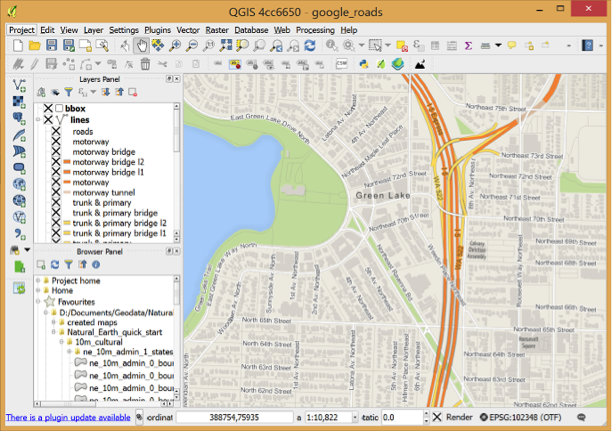
Diagram: QGIS
Source: qgis.org/en/site/about/index.html
You can find an introduction to QGIS here.
2. Google Fusion Tables
Fusion Tables is a web application for data visualization and sharing.
They can be used by anyone with a Google Account. Data from any spreadsheet (Excel or CSV) can be imported. It allows you to filter and summarize data easily and offers different options for data representation.
All data is saved and stored in Google Drive.
Advantages:
- Simplicity and accessibility
- Merging multiple tables to create a single one that contains all sets of data.
- Combining public data with your own.
- When any base data table is updated, the merged table will show the latest value
- Data can be made public or private
- Keeping track of the information source even after merging the data
Google Fusion Maps are rather unsophisticated, compared to other mapping tools, however they work well for designing and monitoring WASH systems.
3. Water Point Mapper
Water Point Mapper (WPM) is a free program for monitoring the distribution and status of water supplies.
It can import Excel data and plot it on a Google Earth satellite image or map.
The maps (KML files) can be opened in Google Earth which must be installed on your computer, and you either must have an internet connection, or that location must have been viewed previously in Google Earth so that it is in the computer’s cache memory.
WPM can be used for:
- planning the water supply investments
- measuring progress and performance
- promoting increased investments in the sector
- allocating resources to deliver basic services where they are most needed
Advantages:
- Purpose-designed for mapping and analysis of waterpoint data
- Automatic mapping
- Input of administrative boundaries and automated calculation and mapping of district-level data
- Area and point-based mapping
- Works offline
Mobile Water Point Mapper is a mobile application that works online and has similar functions.
4. FLOW
Akvo FLOW (Field Level Operations Watch) is a system for the collection, management and analysis of geographically-referenced data.
It is mainly used to track the conditions of water points but is adequate for monitoring any kind of local infrastructure.
It is used on smartphones which are connected to an online database. Maps are immediately accessible to anyone who needs them.
Data is easily updated so information is always up-to-date.
Advantages:
- Phone as a tool for gathering information
- Available to anyone with internet connection
- Easy, one-step solution follow-up data updates
Disadvantage:
- It is a paid product
5. ArcGIS
ArcGIS by Esri is a free cloud-based service that offers real-time information, in-depth data analysis and shows location-related patterns.
It can make 2D and 3D maps and has a built-in map and scene viewer.
It offers access to maps on various topics.
Advantages:
- Woks on any device and is available to anyone
- Scalable
- Controlled privacy
You can find the ArcGIS tutorial here.
6. Surfer 
Surfer provides 2D and 3D mapping, modeling and analysis of data.
Surfer 10 64-bit is available as a free download.
Advantages:
- Accuracy and precision
- Interpolation adjustments
- Control over gridding parameters (including grid files from other sources)
- Data presented in a clear, concise way
Disadvantage:
- It is a paid product, but a free trial version is available.
You can find the Golden Surfer tutorial here.
Other Source:
You can find the basics of QGIS here.